This is a test iCal for the School website.
Category: News
-
Raspberry Pi Zero
At Christmas I was lucky enough to get my hands on one of the elusive Raspberry Pi Zeros. I didn’t get mine off of the front cover of a copy of the MagPi Magazine as like many people I missed that boat but I did quickly manage to purchase one from thePiHut. The small form factor has presented some opportiunities for my desire to create small form factor mobile robot using the Raspberry Pi but has brought some challenges that have required some further research and development.
In order to use the Raspberry Pi Zero as a controller the first thing I have had to do is learn how to use the device headless (without a monitor.) I did purchase the essentials kit from thePiHut and solder the header connections on following this video, I then watched these two tutorials on how to configure the wifi adapter and ensure that the device can be found without needing to know the IP address. Actually, I have now started doing this to all my raspberry pis. This should mean that if I can purchase more Raspberry Pi Zeros then I should be able to do so without the need for micro HDMI connectors.
So, What’s the plan?
I’ve been granted a sum of money to improve one of our courses that we offer as part of our enrichment courses. At school we currently offer a SQA NPA award in Games Programming this sounds attractive and the pupils like it well enough but they can usually achieve the qualification easily enough but hate every minute of the evidence gathering aspect of this qualification. We also have a surplus of time left over which we use to build other skills and have in the past used our Lego Robotics kits to develop their programming skills. The pupils really love this, creating devices that follow black lines and navigate mazes and leave all sorts of programming opportunities.
I would like to take this further and suppliement these skills using the Raspberry Pis to allow pupils to develop projects from scratch to the point that we could even have our own PiWars.
So, what’s the plan? I’d like to develop my own robot with 4 micro gear motors powered by 4 AA batteries. Have the Pi Zero powered by a battery power pack and other than that I will need to mount an H-bridge motor controller. Extra features which I would like to add are an RGB LED which I plan to have displaying one of 4 colours – flashing orange for forward normal operations, flashing red for turning to port (left), flashing green for starboard (right) and flashing white for astern (backwards.). I would also like to fit an HC-SR04 Ultrasonic Sensor so that the robot could be programmed to run autonomously.
Issues?
So, there are many issues which I can work on and some which are more problematic. I will work on ensuring that I have enough GPIO pins for all the functions as well as the programming Python to thread so that I can run the lights as well as the motors however the current supply of Raspberry Pi Zeros mean that I wouldn’t be able to get devices for a class load of these projects and I am wrestling in my brain about this. It seems that their availability seems to be more of an issue than was seen at first.
When will they be available in sufficient numbers? Will they be supplied by a main manufacturer. So, it’s quite nice at one level that smaller retailers seem to be leading the way with the supply of the Pi Zeros however this isn’t ideal for schools as Local Authorities have approved lists of suppliers and none of these suppliers are on the approved lists. Adding suppliers requires significant financial information from the retailer and takes a significant amount of effort from somebody (e.g. me) rendering this an almost impossible task when you have other things needing done at the same time.
So, will RS components, CPC, Farnell and other similarly large retailers supply the Raspberry Pi Zero so that schools can buy them or not? Otherwise I will need to significantly modify my plans.
Has the $5 price point ruined the viability of an otherwise attractive device?
As sometimes the form factor is the attraction and the price could be the stumbling block if it’s preventing manufacturers from developing the Raspberry Pi Zero.
-
OneNote and BYOD
As I mentioned in my last post, I’ve been doing some holiday research into ideas which could help integrte ICT within learning and teaching in a BYOD environment.
This has led me to look at hardware and software suitable which Is largely operating system platform independent.
There is of course, a lot of browser based software out there which help to make bring your own device possible. And in Scotland we are further aided in our National Education intranet called GLOW. The recent upgrades to GLOW to include a O365 SharePoint tenancy for all pupils and teachers further augments the range of tools which pupils can have at home. As all users can now have access to Microsoft Word, Excel, PowerPoint and OneNote coupled with 1TB of cloud based storage in OneDrive (Microsoft’s Dropbox equivalent.)
 The purpose of OneNote has always eluded me somehow as I have always felt that I could achieve the same or better in Word or Publisher. However, OneNote in the context of learning coupled with the ClassCreator tool form a very powerful complimentary partnership.
To explain, OneNote behaves like a pupil’s jotter (or exercise book for non-Scots) where each curricular subject could have a notebook with multiple tabs representing topics and multiple pages for either lessons or sub topics and tasks. Other uses too could include e-portfolios. When you couple this with the fact that OneNote is available for everyone on every platform and free to all learners then we have a powerful tool for learning. In my mind the light bulb has switched on.
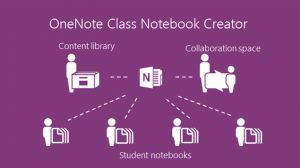
OneNote ClassCreator which is available in SharePoint O365 (GLOW) takes this a stage further allowing teachers to create OneNote notebooks which are allocated to their pupils both tasking them and simultaneously allowing pupils to have the work monitored and corrected (without even the perceived public humiliation of a teacher standing over a shoulder.) There are a number of good video tutorials about this which both demonstrate this in action and can take teacher through the process.
First, watch Microsoft in Education’s YouTube channel. There are 34 videos many of which show the power of OneNote used by pupils coupled with a suitable device. The use of handwritten entries in OneNote is of particular interest.
Second, look at www.onenoteforteachers.com. This shows teachers how to use these tools to set up the class notebooks and how to get the most out of OneNote.
Issues? I always like to identify any downsides too! O365 web based versions are limited as are the apple and Android versions. Microsoft understandably want to sell windows kit therefore the most fully featured versions of all applications are available in Microsoft Office 2013. It’s also worth using this as it integrates from the desktop directly into GLOW. However, this is worth the effort in my opinion. GLOW wouldn’t let me log in to OneNote without a Microsoft account and it didn’t like my GLOW login details. I’m assuming that this is a current glitch that will be resolved soon. Just as ClassCreator wasn’t working until on day of this week.
Overall, this looks like a really useful tool which I plan to explore further in the current weeks.
-
HP Streams and BYOD
The Christmas Holidays have come upon us and that provides a little downtime to facilitate some thinking about new things. This holiday I have been considering the implications of how bring your own device could ever work. Of course this really means that I’ve been investigating the killer hardware and software which would allow this to work. New and favourite pieces of hardware include the new line of products from HP.
The new HP Stream products further demonstrate the cloud based nature of modern ICT. The range includes a 7 inch (£99) tablet, 8 inch (£149) tablets, 11 inch (£169), 13 inch (£229) and 14 inch laptops (£229). They have also just announced a HP Stream mini desktop (~£120).
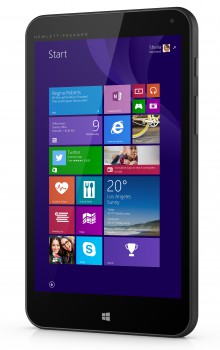
HP Stream 7 The key thing with all of these devices is their low price point. I am writing this post on a HP Stream 7 signature edition which I bought from the Microsoft store at the sale price of £79 with free postage. It’s terrific! I have thoroughly enjoyed using it and as an avid fan of all things Apple I have been quite happy to put my other toys aside in favour of this budget device. As a possible tool for pupils at school this little device can pack a punch and runs Microsoft Office (bundled for a year) with ease. When you consider the ability for Scottish Schools to use windows based devices like this with the national O365 SharePoint tenancy in GLOW then these little devices have the potential to change productivity in the classroom. They also have a fairly parent friendly price compared to Apple devices whilst still allowing access to industry standard applications.
The only downsides which I have discovered are the battery life, as whilst I get a fair few hours from the device it’s not an all day battery, and the cameras are pretty poor. But what do you expect for this price? These haven’t affected the usability of the device for most purposes.
Next, you need the killer apps… My research took me to a variety of applications including OneNote coupled with ClassCreator. However, that is worthy of it’s own post and will come next.
————
This article focuses on the HP Stream devices. Other PC, Apple, ChromeOS and Android devices will also work with GLOW.