As I mentioned in my last post, I’ve been doing some holiday research into ideas which could help integrte ICT within learning and teaching in a BYOD environment.
This has led me to look at hardware and software suitable which Is largely operating system platform independent.
There is of course, a lot of browser based software out there which help to make bring your own device possible. And in Scotland we are further aided in our National Education intranet called GLOW. The recent upgrades to GLOW to include a O365 SharePoint tenancy for all pupils and teachers further augments the range of tools which pupils can have at home. As all users can now have access to Microsoft Word, Excel, PowerPoint and OneNote coupled with 1TB of cloud based storage in OneDrive (Microsoft’s Dropbox equivalent.)
 The purpose of OneNote has always eluded me somehow as I have always felt that I could achieve the same or better in Word or Publisher. However, OneNote in the context of learning coupled with the ClassCreator tool form a very powerful complimentary partnership.
To explain, OneNote behaves like a pupil’s jotter (or exercise book for non-Scots) where each curricular subject could have a notebook with multiple tabs representing topics and multiple pages for either lessons or sub topics and tasks. Other uses too could include e-portfolios. When you couple this with the fact that OneNote is available for everyone on every platform and free to all learners then we have a powerful tool for learning. In my mind the light bulb has switched on.
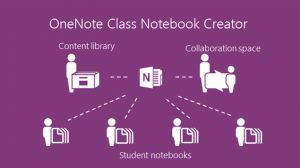
OneNote ClassCreator which is available in SharePoint O365 (GLOW) takes this a stage further allowing teachers to create OneNote notebooks which are allocated to their pupils both tasking them and simultaneously allowing pupils to have the work monitored and corrected (without even the perceived public humiliation of a teacher standing over a shoulder.) There are a number of good video tutorials about this which both demonstrate this in action and can take teacher through the process.
First, watch Microsoft in Education’s YouTube channel. There are 34 videos many of which show the power of OneNote used by pupils coupled with a suitable device. The use of handwritten entries in OneNote is of particular interest.
Second, look at www.onenoteforteachers.com. This shows teachers how to use these tools to set up the class notebooks and how to get the most out of OneNote.
Issues? I always like to identify any downsides too! O365 web based versions are limited as are the apple and Android versions. Microsoft understandably want to sell windows kit therefore the most fully featured versions of all applications are available in Microsoft Office 2013. It’s also worth using this as it integrates from the desktop directly into GLOW. However, this is worth the effort in my opinion. GLOW wouldn’t let me log in to OneNote without a Microsoft account and it didn’t like my GLOW login details. I’m assuming that this is a current glitch that will be resolved soon. Just as ClassCreator wasn’t working until on day of this week.
Overall, this looks like a really useful tool which I plan to explore further in the current weeks.